
Understand, Embrace & Deploy AI in Your Accounting Firm
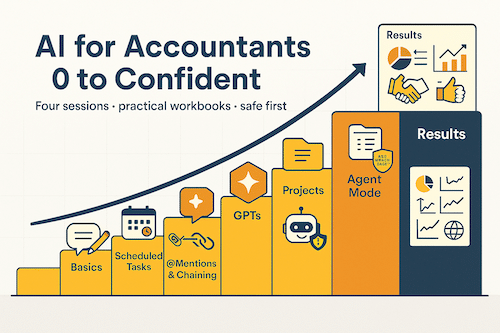
Practical, safe and simple. Four 90-minute sessions with workbooks and copy-paste prompts. Built for accountants who want quick wins, not jargon.
Who This Course Is For
Practice Owners Who Want Time Back
Practice owners who want time back and better conversations with clients.
Senior Team Working Smarter
Senior team who need simple tools to work faster and smarter without technical complexity.
Advisory-Curious Firms
Advisory-curious firms who want to move from numbers to actions and deliver more value.
You will learn how to…
• Create custom agents for your firm
• Automate advisory reporting and client insights
• Use AI to market your firm more consistently
• Build fully automated AI workflows that save time daily
The tech is moving fast. Shane will break it down in simple, non-techie terms – and show you what to do right now to stay ahead.
Whether you’re deep into AI or just starting out – if you haven’t built your own Agent yet, these sessions will show you how.
What You Get
4×90-Minute On-Demand Videos
Watch any time, at your own pace. Pause, rewind, and revisit as often as you need.
Downloadable Workbooks
Print-friendly .docx workbooks for each session. Write in them, highlight, and make them yours.
Copy-Paste Prompt Library
Every prompt uses the same simple structure: #job, #context, #rules, #output_format, #plan. No guessing.
Bonus Resources
Sessions that cover images, @mentions chaining guide, Agent Mode safety snippets, and Canva Connect Apps.
Course Overview — 4 Sessions
Session 1
-
By the end of this session you will be able to:
- Use a simple, repeatable structure that helps AI give you clearer, more accurate results with less effort.
- Turn routine tasks into time-savers, including:
- Converting messy meeting notes into a clear, actionable plan.
- Transforming long transcripts into concise recaps, detailed notes, and next steps.
- Turning a “rant” or emotional brain-dump into a tactful, professional client email.
- Turning raw accounts into a client-ready analysis, saving you prep time.
- Set custom ChatGPT instructions so its responses match your tone, style, and formatting—so it sounds like you, not AI.
- Leave with one practical quick win already scheduled to implement immediately.
Session 2
By the end of this session you will be able to:
- Confidently choose the right tool—Chat, GPT, Project, or Scheduled Task—so you work faster with less friction.
- Build two reusable GPTs (Brand Guidelines and HR Guide) that save you time and bring consistency to your team.
- Automate at least one recurring task using a Scheduled Task that produces a ready-to-use output without you needing to remember it.
- Know when to use @mentions to pull a GPT into another thread, and when to keep work inside a Project for clarity and file organisation.
- Walk away with a personalised plan showing exactly how you’ll use one GPT and one Scheduled Task in your firm this month.
Session 3
-
By the end of this session you will be able to:
- Build and demo a Project that keeps all related conversations and assets in one organised hub (e.g., Marketing Hub).
- Connect tools like Dropbox or Canva only when needed—no complex setup.
- Use Agent Mode safely by supervising an example task (restaurant finder) that asks before taking action.
- Map out a simple website chatbot in n8n so you’re ready to build and deploy it in the next session.
Session 4
-
By the end of this session you will be able to:
- Add a plain-English business context file to your chatbot via Dropbox/OneDrive so it understands your firm and gives relevant answers.
- Embed your chatbot on a web page and test it live.
- Build a LinkedIn editorial helper agent that drafts three posts plus image ideas—ready to schedule.
- Turn one of your session wins into a polished LinkedIn post and a 120–160-word video script using the Journalist Interview GPT.
What People Are Saying
“These more practical sessions, with a system being built live, supported by a workbook for offline practice, are fantastic”
“Technology is changing the way we provide accounting services to our client hence the need to learn from these sessions so that we can become better equipped”
“Shane was great!! He kept it simple, practical and I learnt a lot”
Pricing & Access
Get instant access to all four sessions, workbooks, and prompt library. Watch at your own pace.
Frequently Asked Questions
Do I need to be technical?
No. We use plain English and simple steps. If you can send an email, you can do this.
What software do I need?
Current ChatGPT plan with GPT builder/Projects/Agent Mode features; Canva (for branding items); n8n account for the chatbot.
Is client data safe?
We start with read-only tasks, use anonymised exports, and avoid logging in to client systems.
How long is each session?
About 90 minutes, plus time for your workbook tasks.
Is this live or on-demand?
On-demand. Watch anytime, pause, rewind, and revisit as needed.
Can my team join?
As with all online courses you will have a personal user name and password to access. You can of course sit together with your team and work through it together.
Will this replace my judgement?
No. You still sanity-check outputs. AI assists; you decide.
What if I’m not happy?
14-day money-back guarantee. If you don’t find value, we’ll refund you.
How long will I have access to the course
You will have access to the course for 90 days – technology is moving so fast you need to act now
Start Today — Get Instant Access
Watch Session 1 tonight. Print the workbook. Open your first prompt.
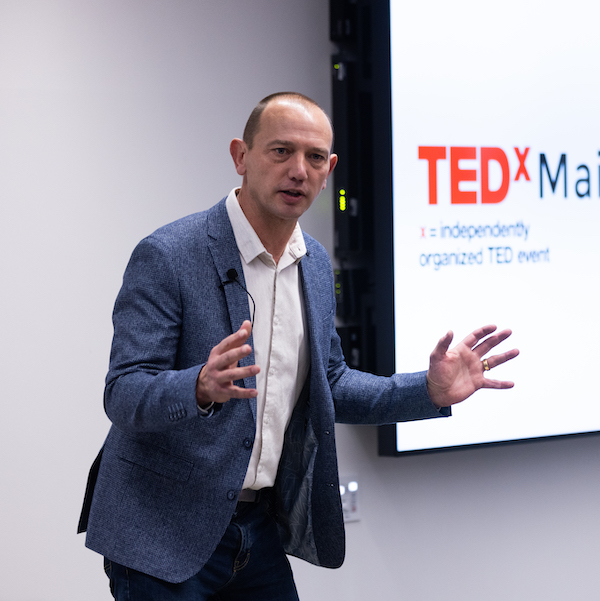
About Shane Lukas
Business coach and author at AVN The Accountants’ Network
Shane has spent 27 years helping over 6,000 accountants across 13+ countries to improve their practices. His teaching style is friendly but firm, using simple words and short sentences to make complex topics accessible.
Shane believes accountants should spend more time advising and less time in spreadsheets — and AI is one of the tools that makes that possible.